Turn your computer keyboard into a MIDI instrument.
A piano or a button accordion on the small keys, with a different instrument for every keyboard. Keynortia sends MIDI notes to any synthesizer, sampler, plugdata patch or DAW you like, exactly as if you were playing a MIDI keyboard.
One keystroke at a time. One note at a time. Fate is in your hands.
Linux, Windows and macOS. Free and open source, MIT license.
Try it here
Your keyboard is the instrument. Press keys on the digits, QWERTY, ASDF and ZXCV rows, or click the keys below. If nothing happens, click the page once first.
Your browser is holding the sound back. Click or tap the page once and play again.
The sound here comes from a small synthesizer built into this page. The program itself makes no sound: it sends MIDI notes to the synthesizer you choose. Keys are identified by position, not by the letter printed on them, so the layouts are the same on AZERTY, QWERTZ or Dvorak.
What it does
- Two instruments, three layoutsA piano, and a chromatic button accordion in the B system or the C system. The layouts are fixed, on the 45 small keys of the four main rows.
- One instrument per keyboardPlay the piano on your laptop and the accordion on a USB keyboard, at the same time. Every keyboard is told apart from the others.
- Exclusive modeWhile a keyboard is an instrument its keys only play. They no longer type in any other program.
- Position, not lettersKeys are identified by where they are, so the layouts are the same on QWERTY, AZERTY, QWERTZ, Dvorak and so on.
- Plays in the backgroundKeep a DAW or plugdata in front and play. A Bluetooth keyboard that sleeps and wakes up starts playing again without a click.
- MIDI outA virtual port called Keynortia on Linux and macOS, or any MIDI port that already exists. On Windows that means loopMIDI or the Microsoft GS Wavetable Synth.
- On-screen keyboardIt lights up the keys you press, with the name of every note (Do Re Mi or C D E). Octave shift, velocity and MIDI channel are there too.
- One small native programWritten in Rust, with a terminal-inspired look in the Etruscan style. It never connects to the internet.
The program
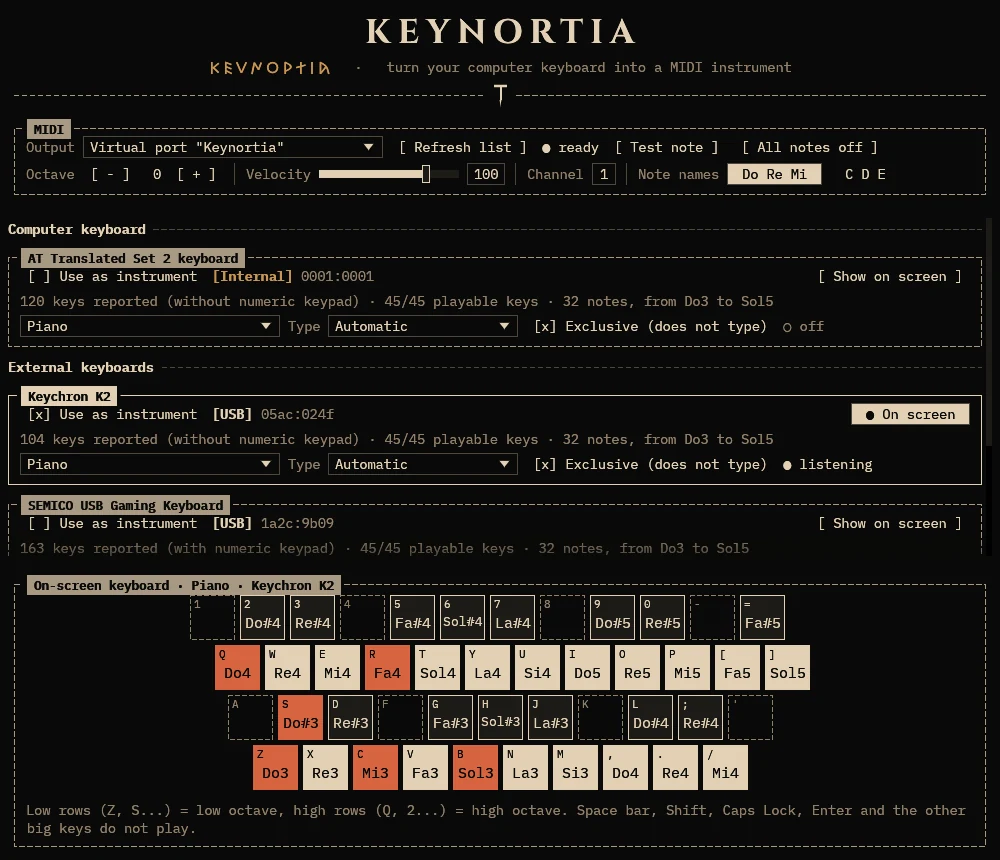
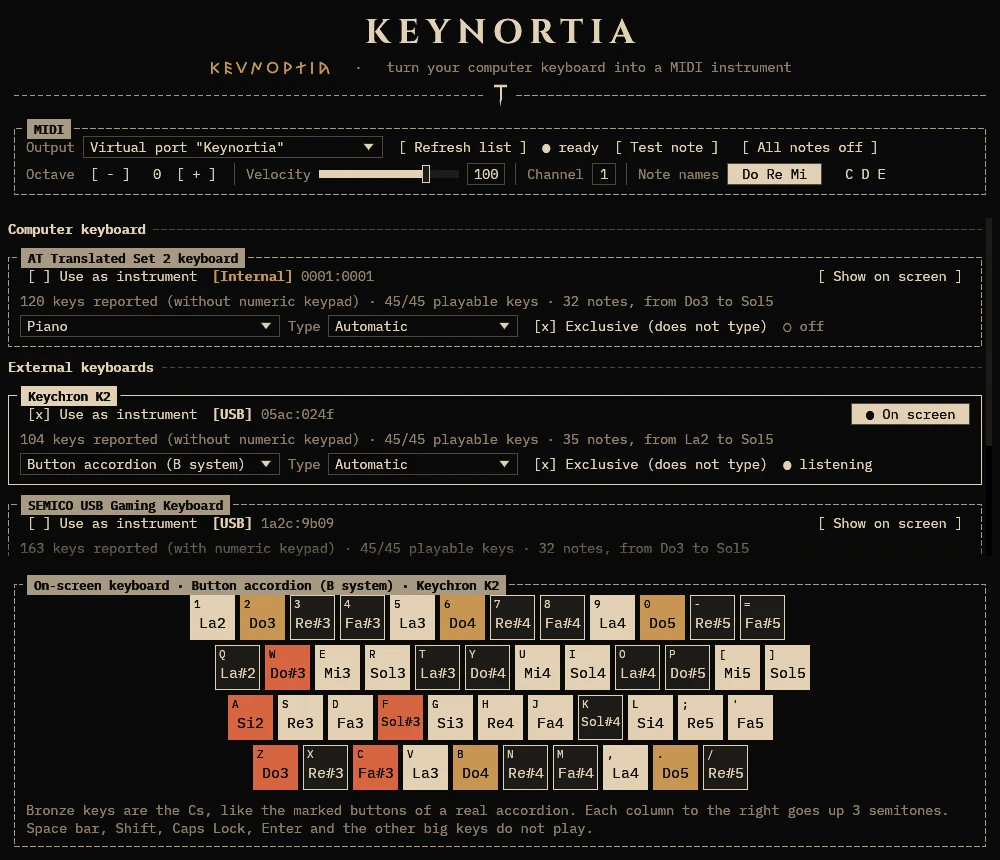
The keyboards in the screenshots are made up.
Install
Download the file for your system from the Releases page. SHA256SUMS has the checksum of each file.
Linux
Ubuntu, Debian, Linux Mint, Pop!_OS…
keynortia_<version>-1_amd64.deb (arm64 on ARM)
sudo apt install ./keynortia_*_amd64.debFedora, RHEL, openSUSE…
keynortia-<version>-1.x86_64.rpm (aarch64 on ARM)
sudo dnf install ./keynortia-*.x86_64.rpmArch Linux, Manjaro, EndeavourOS…
keynortia-<version>-1-x86_64.pkg.tar.zst
sudo pacman -U keynortia-*-x86_64.pkg.tar.zstAny other Linux
keynortia-<version>-linux-x86_64.tar.gz (aarch64 on ARM)
tar xf keynortia-*-linux-x86_64.tar.gz && cd keynortia-*-linux-x86_64 && ./keynortiaWindows 10 and 11
keynortia-<version>-windows-x86_64.zip
Extract the zip anywhere and double-click keynortia.exe. Windows may say “Windows protected your PC”, because the program is not code-signed: click More info, then Run anyway.
macOS 11 or later
Keynortia-<version>-macos.dmg (Apple silicon and Intel)
Open the .dmg and drag Keynortia onto Applications. The first time, macOS blocks apps that are not notarized: open System Settings → Privacy & Security and click Open Anyway. When you switch a keyboard on, allow Input Monitoring.
One thing to do once on Linux
Linux keeps the input devices for members of the input group. Add yourself to it, then log out and back in (or reboot). If you forget, Keynortia tells you, with this very command, when you start it.
sudo usermod -aG input $USERHearing it
Keynortia sends MIDI. A synthesizer makes the sound. Pick the Output in the program, then press Test note: you should hear a middle C.
- Linux: Keynortia opens a virtual port called
Keynortia. Pick your synthesizer's port in the Output list, or connect the virtual port to it with your DAW,qpwgraphoraconnect. FluidSynth with a General MIDI soundfont is a quick one to try. - Windows: leave the Output on Microsoft GS Wavetable Synth for a first test. To reach another program, install the free loopMIDI, create a port, and enable the same port in that program.
- macOS: start Keynortia first, then enable
Keynortiaamong the MIDI inputs of the program that makes the sound.
Status
Keynortia is at version 0.1. Linux is the main platform and the one that has been tried on real keyboards. Windows and macOS are new: they are built and tested automatically on every change, but they have seen little use on real machines, above all the exclusive mode. If something does not work, please open an issue and say which system, which keyboard and what the window says.
| Linux | Windows | macOS | |
|---|---|---|---|
| Tells the keyboards apart | yes | yes | yes |
| Exclusive mode | yes, always | yes, with a keyboard hook | best effort: macOS may refuse |
| Virtual MIDI port | yes | no, use loopMIDI | yes |
| Set up once | join the input group | loopMIDI, to reach other programs | allow Input Monitoring |
Quick start
- Start Keynortia. The window has three parts: the MIDI settings at the top, the list of your keyboards, and the on-screen keyboard at the bottom.
- Make sure something is listening. Press Test note. You should hear a middle C.
- Tick “Use as instrument” on the keyboard you want to play. An external keyboard is the comfortable choice: the keys of the keyboard you switch on stop typing.
- Pick the instrument: Piano, or Button accordion in the B or the C system.
- Play on the digits, QWERTY, ASDF and ZXCV rows. The on-screen keyboard shows the note of every key. To stop, untick “Use as instrument” with the mouse. Closing the window frees the keyboards too.
If your only keyboard is the one you are playing, keep the mouse at hand. With Exclusive on, the keys of that keyboard cannot type anything else. Untick “Use as instrument”, or close the window, and it types again.
What it looks at
A program that reads keys should say what it does with them.
- No networking codeKeynortia never connects to the internet and sends nothing anywhere.
- Keys become notes, nothing elseIt keeps no log and writes nothing to disk, apart from the keyd configuration if you ask it to free a keyboard on Linux.
- Only the keyboards you switch onIt acts on those keyboards only, and only on their 45 small keys. Everything else you type passes through untouched. The details for each system are in the manual.
- Open source, built in the openThe releases are built by GitHub Actions from the tagged source, and
SHA256SUMSlets you check the files you downloaded.
About the name
Keynortia is inspired by Nortia, an Etruscan goddess of fate and fortune: it turns every keystroke into a note, weaving your own musical destiny.
The Roman historian Livy, on the word of the antiquarian Cincius, tells that nails were fixed in her temple at Volsinii to mark the number of the years1. Reference works add that a nail was driven into the temple wall every year2,3. The nails and the hammer of the logo recall them. The title of the program's window is written in Etruscan letters (the Old Italic alphabet) as well as in plain ones, one letter for each of ours4.
- Livy, Ab Urbe Condita 7.3.7, English translation by Canon Roberts (1912): Perseids.
- William Smith (ed.), A Dictionary of Greek and Roman Biography and Mythology, entry Nortia: Perseids.
- Nortia on Wikipedia, which lists the ancient sources and the modern studies.
- Etruscan alphabet on Wikipedia. Keynortia is a modern name, so its Etruscan letters are a transliteration, not a spelling an Etruscan would have used.